EmailBoss cleans up your inbox, drafts replies in your voice, summarizes attachments, and turns meetings into follow-up emails — from a privacy-focused Windows desktop app.
Windows desktop software • 64-bit Windows PC required
🎧 New: record, transcribe & summarize meetings — and no bot ever joins your call.
Windows desktop app | Monthly subscription | Gmail or Outlook | Cancel anytime
Compare Basic and Pro with secure JVZoo checkout.
Illustration note: this video represents an actual cleanup of 3,700+ emails from my Outlook inbox. The animation is illustrative, not a screen recording. Actual cleanup time varies by mailbox size, provider limits, plan limits, and other AI activity.
Use your microphone, import existing audio, or record a meeting locally on your PC with Pro. EMaiL BOSS creates a transcript and structured notes; Pro also adds meeting templates, Ask BOSS transcript Q&A, and a follow-up email draft for you to review, copy, and send.
Choose Plan & ProviderStart with a guided setup path. Pro builds the complete personalized EMaiL Guide from your real workflow.
Pick the mailbox provider you already use so checkout and setup start from the right path.
The guided setup creates a quick EMaiL Guide so you can test cleanup, AI drafting, calendar, Mail Studio, attachment summaries, and meeting workflows.
Pro analyzes your inbox, sent mail, business description, and up to 3 websites to build the complete personalized EMaiL Guide.
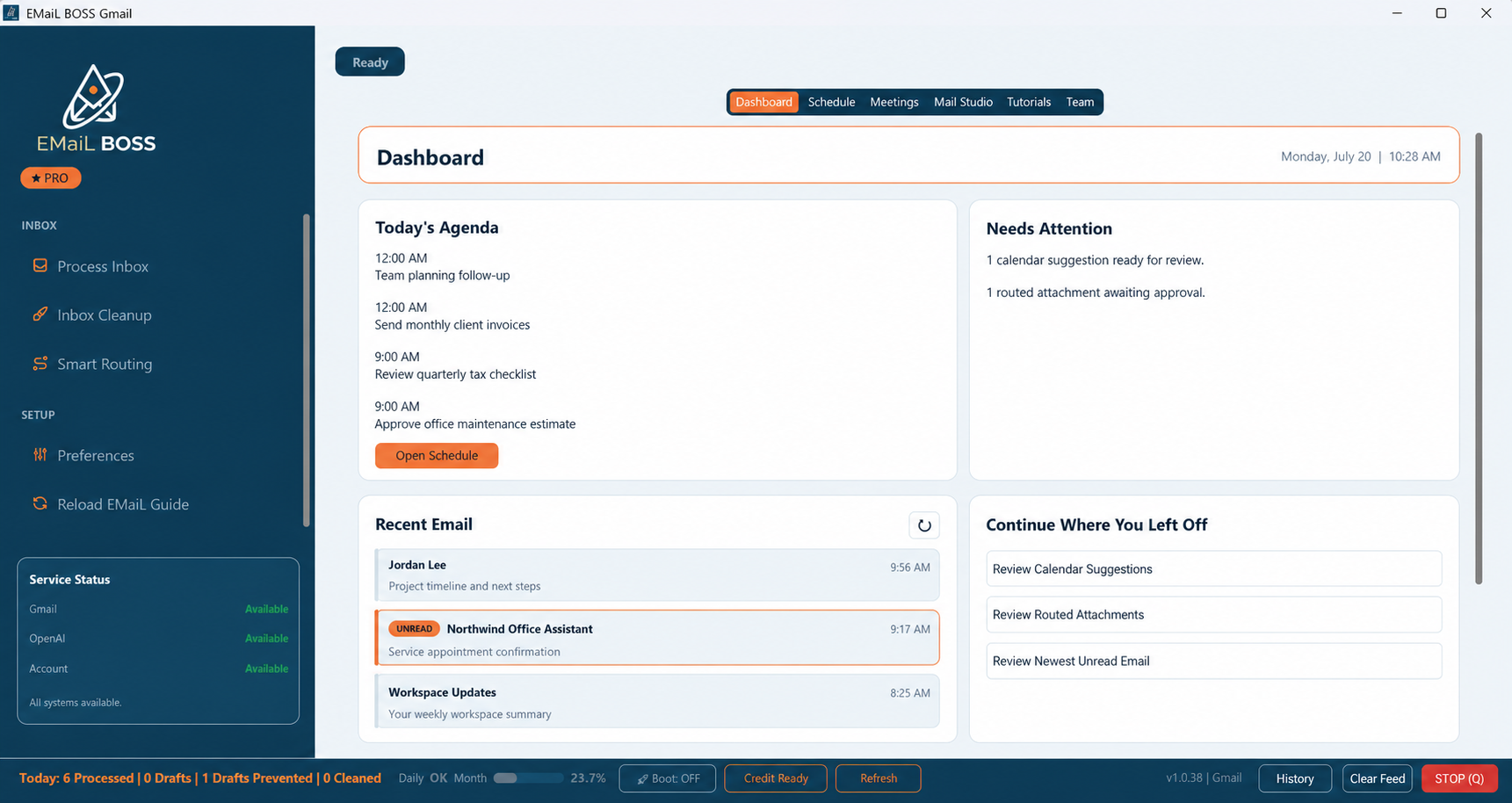
Review recent email, today’s agenda, calendar suggestions, routed attachments, and your next actions from one Windows desktop workspace.
From the first draft to the final scheduled event, EMaiL BOSS handles the heavy lifting so you can focus on the work that actually matters.
Click or tap any category below to view its features.
Learns your inbox patterns and writing style so drafts sound like you — not a generic AI assistant.
Use AI in Mail Studio to write a polished forward for any purpose, review and edit the message, and save it as a draft while preserving an existing reply draft when applicable.
Choose standard draft support or let EMaiL BOSS proactively prepare likely replies for the messages that need attention.
Converts PDFs, Word docs, and images into fast readable summaries with key details and action items highlighted.
Optional Pro preference. When Knowledge Base is enabled, uses saved email history and contact context to produce more grounded replies when past conversations matter.
Speed up prompts, schedule actions, and reply drafts when you want to speak instead of type.
Review related threads, add AI Instructions, speak audio-to-text instructions for manual reply drafts and manual new emails, refine email-ready markdown drafts, and save replies from a focused drafting workspace.
Off by default for privacy. Pro users can enable Knowledge Base to allow saved email-history search; when off, Pro features still work without Knowledge Base grounding.
Making you the EMaiL BOSS!
Automatically builds the EMaiL Guide so every plan starts with standard sorting and drafting instructions. You can still edit labels/categories and manually update the guide for your personal workflow.
Add or edit labels and categories in Gmail or Outlook, then edit the EMaiL Guide with new labels and instructions.
Create rules that automatically route matching emails into precise sub-labels, folders, or categories based on business priority.
Connect a Smart Routing folder to a local, OneDrive, or Dropbox folder. Eligible attachments wait for Dashboard approval before they are saved, with an optional searchable summary text file when available.
Keep processed mail in the inbox or move it into labels, folders, or categories so you can reclaim a cleaner, lower-noise inbox without losing control.
Reduce inbox clutter by moving completed or sorted messages into the right labels or folders while keeping the important work visible.
Step-by-step wizard connects Gmail or Outlook, configures your preferences, and activates features in minutes.
Stages schedule entries from deadlines, invites, and action emails so you can review and book with less manual data entry.
Find openings, explain conflicts, and create calendar events from one guided desktop workspace with voice or text commands.
Basic includes schedule overview, Today Calendar Briefing, 7-Day Calendar Briefing, and calendar create/edit/delete. Pro adds AI 7-Day Calendar Review and Email Brief for deeper workflow review.
Choose how to capture the conversation, then turn it into a transcript, organized notes, answers, and follow-up work. No meeting bot joins your call.
Capture a conversation through your microphone, then create a transcript and readable meeting notes.
Import an existing supported audio recording and turn it into a transcript and structured notes.
Record meeting audio locally on your Windows PC without inviting a recording bot into the call.
Turn captured or imported audio into a transcript with a summary, decisions, action items, and other useful meeting details.
Organize notes for sales calls, 1:1s, standups, interviews, lectures, and other meeting types.
Ask questions about a meeting and receive answers grounded in the transcript, without searching through the recording yourself.
Create an AI follow-up email inside the meeting notes for you to review, copy, edit, and send.
Many AI productivity tools route work content through the vendor's own servers before the user gets a result. EMaiL BOSS takes a different path: the workflow runs from a Windows desktop app, so B.O.S.S. servers do not receive, route, read, store, or train on your email, calendar, meeting content, attachments, reference documents, or other work files. The desktop app connects directly to Gmail or Outlook and, only when needed for a feature you choose, directly to the AI provider. Google CASA Tier 2 validation supports the access controls, but the bigger advantage is the desktop-first design.
Your workflow starts from the desktop app, not a B.O.S.S.-hosted inbox or workspace. Gmail or Outlook provides the connected email and calendar data; the AI provider receives only the content needed for the features you choose.
B.O.S.S. servers do not receive email, calendar, meeting, attachment, document, or other work-file content. Account, activation, billing, and AI usage information remain separate from your work data.
An independent CASA security assessment was completed for the desktop OAuth flow used in Google's approved verification process. The resulting Letter of Validation supports the OAuth handling, token handling, and permission boundaries behind the workflow.
The Windows desktop app starts each connection. B.O.S.S. servers are not an intermediary for your email, calendar, meetings, attachments, documents, or other work files.
EMaiL BOSS runs locally, keeps its settings and authorization tokens on your device, and starts only the workflows you choose.
The desktop app connects directly to Google or Microsoft for the email and calendar account you authorize.
When a selected AI feature needs content, the desktop app sends only the necessary content directly to the configured AI provider.
B.O.S.S. servers: account activation, licensing, billing, plan and purchase-entitlement administration, update eligibility, and AI usage tracking only—not user work data.
EMaiL BOSS keeps the workflow on your desktop and keeps B.O.S.S. servers out of your work-data path. Outside your computer, Gmail or Outlook accesses the connected email and calendar data, and the AI provider receives only what is needed for the feature you choose.
Your desktop version does not route email, calendar, meeting content, attachments, documents, or other work files through B.O.S.S. servers.
Gmail or Outlook and the AI provider are used only as needed for the features you select. B.O.S.S. does not host, read, store, or train on your work data.
Because work data is not routed through B.O.S.S. web servers, there are fewer company-side systems and vendor touchpoints around your email, calendar, meeting, and file content.
Faster sorting, faster reading, faster drafting, and less manual follow-up. EMaiL BOSS reduces inbox time — not just inbox clutter.
Inbox, attachments, business knowledge, and schedule tools all working together so tasks never fall through the cracks.
Choose the plan and email provider that match your inbox, schedule, meeting, and drafting workload.
Windows desktop app | Secure checkout through JVZoo | Select Gmail or Outlook before purchase | Review, edit, and send your own drafts
Windows desktop software: Requires a 64-bit Windows PC, internet connection, and a supported Gmail or Microsoft mailbox.
Best for users who want cleaner inboxes, personalized drafts, Mail Desk, calendar briefings, calendar edits, and meeting notes.
Best for users who want Smart Routing, review-first attachment routing, attachment summaries, meeting tools, deeper calendar review, full Pro calibration, and higher AI capacity.
Built-in video tutorials help you get started and make better use of Pro workflows.
After checkout, your JVZoo download page gives you the EMaiL BOSS access instructions, setup steps, and support contact for the Gmail or Outlook product you selected. Basic includes the guided desktop workflow. Pro unlocks full inbox, sent-mail, business-description, and up to 3 websites for the complete personalized EMaiL Guide.
EMaiL BOSS requires a 64-bit Windows PC, an active internet connection, a current web browser for secure authorization, permission to install the desktop app, and a supported Gmail or Microsoft mailbox. Choose the Gmail or Outlook version that matches the mailbox you plan to connect.
No. EMaiL BOSS drafts, organizes, summarizes, and prepares follow-up work for you to review. You stay in control of what gets sent.
No. B.O.S.S. servers do not receive, route, read, or store your email, calendar, meeting recordings or content, attachments, reference documents, or other work files. The desktop app connects directly to Gmail or Outlook and, only when an AI feature needs content, directly to the AI provider. B.O.S.S. servers separately handle account, activation, billing, and AI usage information—not your work data.
No. AI Knowledge Base is off by default for privacy.
When it is off, EMaiL BOSS uses only the current email and any included attachments for that AI request. Uploaded documents, draft history, and processed-email reference history are not saved with the AI provider for future lookup.
When it is on, you can add reference documents, and EMaiL BOSS can save reference history so future AI requests can search that extra context. Pro features still work when AI Knowledge Base is off.
No. Turning it off only stops Knowledge Base search and background sync/upload. Deleting an existing Knowledge Base would be a separate action.
Yes. Choose Gmail if you use Gmail. Choose Outlook if you use Outlook.com, Hotmail, Live.com, or a Microsoft 365 work/school mailbox. Your JVZoo purchase should match the desktop app you plan to install.
Yes. EMaiL BOSS runs on your Windows computer, but you can access that computer remotely with a secure remote desktop tool such as Google Chrome Remote Desktop. Install it on your desktop and on your iPhone, iPad, or Android phone, then connect to your computer while you are away. With normal pinch-to-zoom on your phone, you can control EMaiL BOSS much like you would from your desk.
Yes. If you use a desktop AI agent that can access your computer and you can communicate with that agent from your phone, it can be another way to work with EMaiL BOSS while you are away. For example, you could ask the agent to open EMaiL BOSS, check an email briefing, review inbox cleanup or triage results, summarize AI insights, look for calendar openings, or help you understand draft replies and attachment summaries from the same desktop where EMaiL BOSS is installed. This is separate from EMaiL BOSS itself and depends on the agent you use, the permissions you grant, and your security settings. You should personally review important actions, especially replies, calendar changes, or sensitive mailbox data.
Your selected monthly subscription is charged when you complete JVZoo checkout. It then renews monthly until canceled.
Basic starts with the guided desktop workflow and Basic plan features. Pro starts with full Pro access and can build a personalized EMaiL Guide using inbox and sent-mail history, your business description, and up to 3 websites.
Yes. You can cancel future recurring payments through JVZoo. EMaiL BOSS access remains tied to the subscription status reported by JVZoo.
No. EMaiL BOSS records locally on your PC — nothing joins your call and no meeting bot appears in the room. You can also import an existing audio file.
An AI transcript plus structured notes — summary, decisions, action items, and more. Basic covers microphone and uploaded-audio notes; Pro adds PC recording, meeting-type templates, Ask BOSS transcript Q&A, and an AI-drafted follow-up email.
Basic gives you microphone and uploaded-audio transcription with readable notes and search. Pro adds full PC meeting recording, templates (sales, 1:1, standup, interview, lecture, and more), Ask BOSS Q&A grounded in the transcript, and a follow-up email written into the meeting notes for you to review, copy, and send. Knowledge Base grounding is optional and off by default in Pro preferences.
On your own computer. When you request transcription or another AI meeting feature, the desktop app sends only the needed content directly to the AI provider. Meeting content is not routed through or stored on B.O.S.S. servers.
Disclaimer: Please note that this product does not provide any guarantee of income or success. The results achieved by the product owner or any other individuals mentioned are not indicative of future success or earnings. This website is not affiliated with FaceBook or any of its associated entities. Once you navigate away from FaceBook, the responsibility for the content and its usage lies solely with the user. All content on this website, including but not limited to text, images, and multimedia, is protected by copyright law and the Digital Millennium Copyright Act. Unauthorized copying, duplication, modification, or theft, whether intentional or unintentional, is strictly prohibited. Violators will be prosecuted to the fullest extent of the law.
We want to clarify that JVZoo serves as the retailer for the products featured on this site. JVZoo® is a registered trademark of BBC Systems Inc., a Florida corporation located at 1809 E. Broadway Street, Suite 125, Oviedo, FL 32765, USA, and is used with permission. The role of JVZoo as a retailer does not constitute an endorsement, approval, or review of these products or any claims, statements, or opinions used in their promotion.